Explainers
Agentic Coding Tools Explained: How They Work
Agentic coding tools plan tasks, edit files, run tests and fix failures. How the agent loop works, what productivity studies found, and how to supervise agents safely.
By Mohit P · · 14 min read
Agentic coding tools are AI systems that don’t just suggest code, but autonomously plan tasks, edit multiple files, run tests, and iterate on failures. Controlled studies estimated productivity gains of about 21% and 26.08%, but the difficult part isn’t starting an agent, it’s supervising what happens next.
You’ve probably experienced the old version of this workflow. You type a function, accept an inline suggestion, correct a missing import, and continue writing the code yourself. The assistant helps with keystrokes, but you remain responsible for every decision and every file.
Now picture leaving your desk while an agent is halfway through a refactor on a branch. It has inspected the repository, changed several files, started the test suite, and may need your approval before running another command. The practical question is no longer whether AI can write a line of code. It’s whether you can safely delegate a development task and stay in control when the task continues without you.
That distinction matters for desktop tools, terminals, cloud workspaces, and mobile interfaces such as Clawdex. The useful skill isn’t blind delegation. It’s learning how the agent loop works, where reliability breaks down, and which controls let you supervise work from a phone without approving changes you haven’t properly inspected.
The Shift From Autocomplete to Agentic Coding
A developer once asked an editor assistant to complete a function that parsed a configuration file. The assistant filled in the next few lines, suggested a type conversion, and waited. The developer still had to locate the related tests, update the caller, run the test suite, and decide whether the change belonged in the current branch.
That workflow is autocomplete with context. It can be useful, but the unit of work is usually the cursor, the function, or the immediate code block.
Agentic coding grew from that model into something broader. A technical history of agentic coding traces the progression from editor-based suggestions to systems that plan work, modify repositories, invoke tools, run tests, and respond to failures. GitHub Copilot’s technical preview appeared in June 2021, ChatGPT became publicly available in November 2022, and SWE-bench introduced repository-level software issues in October 2023. Those milestones show why the category changed: the challenge moved from producing plausible snippets to completing work across a real codebase.
The repository became the unit of work
Suppose you give a tool this request:
Add rate limiting to the public API, update the configuration example, add tests, and document the failure response.
An autocomplete assistant might help write the middleware after you open the correct file. An agentic tool should first inspect the repository structure, identify the API entry points, find the configuration pattern, locate existing tests, and determine how errors are represented. It may then edit several files, execute the relevant test commands, and revise the patch when a test fails.
The task is still not fully autonomous software engineering. The agent can misunderstand the requirement, choose the wrong abstraction, or satisfy a narrow test while violating a broader contract. It does, however, operate across a longer development loop.
That loop also explains why away-from-the-desk access matters. If the tool only suggests a line, you need to be present at the keyboard. If it can perform a sequence of repository operations, your scarce resource becomes attention and supervision.
The history is useful because it prevents a common category error. An assistant that predicts the next token and an agent that manages a multi-file task may use similar language interfaces, but they create different risks. One interrupts your typing. The other can accumulate incorrect decisions while you’re away.
What Makes a Coding Tool Agentic
Think of a traditional coding assistant as a colleague whispering suggestions over your shoulder. You decide which file to open, what command to run, and whether the result is correct.
An agentic coding tool is closer to a junior developer who receives a ticket. You give it a goal, access to a repository and a set of tools, then review its plan, changes, command output, and evidence. The junior developer can move faster than a whispering assistant, but you still wouldn’t merge their first patch without looking at it.
Core distinction: An assistant suggests code at the cursor. An agent operates across a development loop, from understanding a task to modifying files, executing tools, and validating the result.
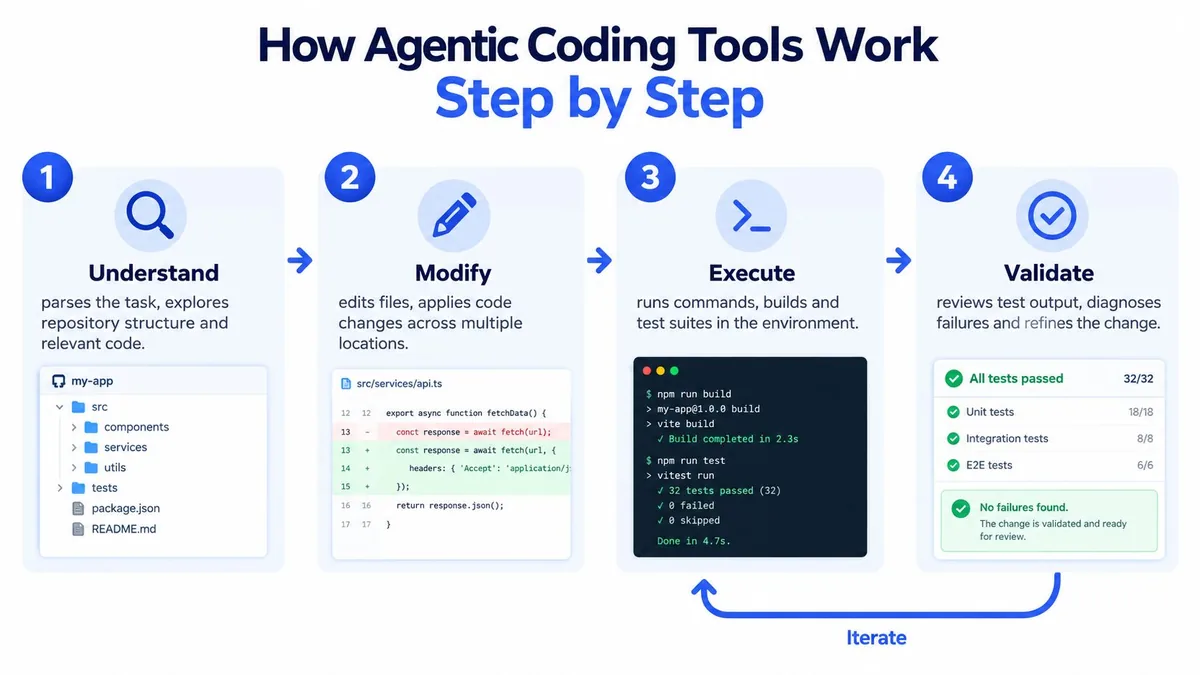
Four properties define the category
Task-level operation comes first. You describe an outcome rather than requesting a single completion. “Rename this variable” is a small edit. “Move authentication into a service, preserve the existing API, and update tests” gives the agent a task with several dependencies.
Multi-file awareness follows. The agent needs to search the repository, connect definitions to their callers, and understand where tests and configuration live. It doesn’t need perfect comprehension, but it needs enough context to avoid treating one file as the whole system.
Tool invocation is what turns conversation into action. Depending on the environment, the agent may inspect files, search text, run a formatter, execute a test command, inspect Git status, or create a diff. Those operations have consequences, so a production workflow should distinguish safe observation from commands that alter the workspace.
Iteration on failure closes the loop. If a test fails, the agent reads the output, forms a new hypothesis, edits the code, and runs verification again. A tool that writes a patch but never checks its work is an automated generator, not a dependable coding agent.
Controls separate a demo from a workspace
A toy demonstration can hide state. A serious runtime should expose it. You should be able to see the repository and branch identity, changed-file diff, command history, test evidence, and current task context.
It should also provide approval boundaries, rollback, and a clear way to stop execution. Without those controls, the interface encourages a dangerous assumption: that a fluent progress message means the underlying work is sound.
The most useful mental model is not “AI programmer.” It’s delegated junior developer with a terminal. You provide direction and guardrails. The agent handles mechanical exploration and implementation. You remain accountable for the behavior that reaches users.
Video: What is OpenClaw? Inside AI Agents, LLMs and the Agentic Loop (IBM Technology, YouTube).
How Agentic Coding Tools Work Step by Step
A coding agent usually follows a loop rather than a single generation. The names vary by product, but the mechanics are recognizable.
Understand
The agent begins by turning your request into an internal plan. It may inspect the repository tree, search for symbols, open related files, read existing tests, and identify configuration or build conventions.
This stage is where precise task framing pays off. “Improve the login flow” leaves too much room for interpretation. “Reject expired sessions, preserve the current response shape, add regression tests, and don’t change the database schema” gives the agent constraints it can check.
The runtime should show the plan and the files it considers relevant. If it suddenly focuses on an unrelated package, you can stop the run before incorrect assumptions spread.
Modify
Next, the agent applies changes. A simple request may touch one file. A realistic feature can involve implementation code, tests, documentation, configuration, and generated artifacts.
The important evidence is the diff, not the agent’s explanation. A concise progress message can sound convincing while the patch changes an unintended file or removes an existing behavior. Reviewers need file names, additions, deletions, and enough surrounding context to understand the effect.
Execute
The agent then invokes commands in its environment. It might run a formatter, build the project, execute targeted tests, or run the full suite. The purpose isn’t merely to prove that the code compiles. Tests provide feedback about whether the new behavior fits the repository’s existing assumptions.
Execution needs permission boundaries. Reading a file is different from installing a dependency, deleting generated output, modifying a database, or sending a request to an external service. A capable tool should make those differences visible.
Validate and iterate
A passing command doesn’t automatically prove the task is complete. The agent should compare the result with the original requirement, inspect failures, and decide whether another edit is needed. If a test reports an incorrect response code, that output becomes input for the next cycle.
A useful interface streams structured events, including the plan, tool call, command output, diff, and test result. A raw chat transcript hides too much. Structured events let you notice context loss, reject an unsafe command, or stop an incorrect trajectory while it’s still small.
For developers building or evaluating these systems, quantization explained is a separate model-efficiency concern. It shouldn’t distract from the more immediate operational question: can a person see and control every meaningful step of the agent loop?
Realistic Productivity Gains and Trade-Offs
The evidence supports a measured claim. AI-assisted coding can help on some tasks, but the result depends on the tool, the developer, the codebase, and the kind of work being measured.
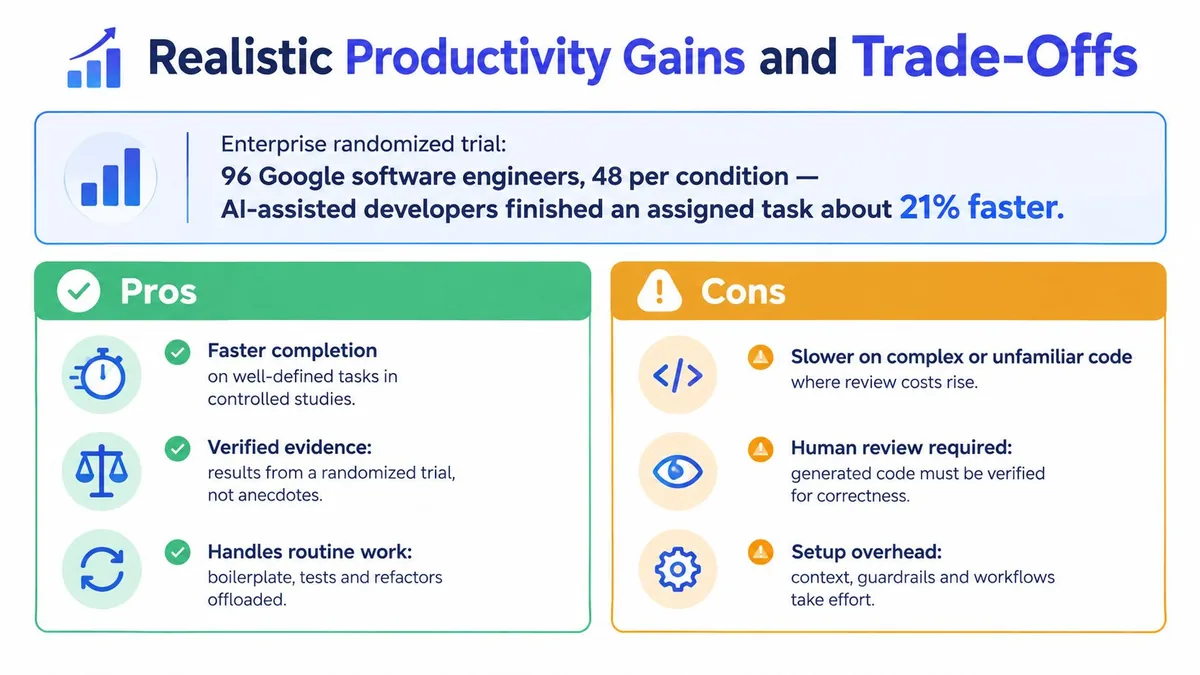
An enterprise randomized trial reported by the IEEE Computer Society assigned 96 Google software engineers, with 48 in the AI-enabled condition and 48 in the control group, to an enterprise-grade programming task. The best estimate was that AI-assisted developers completed the task about 21% faster, although the researchers reported a large confidence interval and found that controlling for additional factors reduced statistical significance.
A separate MIT-affiliated experiment estimated a 26.08% productivity increase, with a reported 10.3% standard error, from a generative-AI code-suggestion tool. The underlying experiment is documented in this MIT working paper on Copilot experiments.
Those figures are useful evidence, but they aren’t a promise attached to every agentic workflow.
Why the number doesn’t transfer automatically
The studies measured particular participants, tasks, and tools. A well-defined implementation task can benefit from rapid boilerplate generation and immediate feedback. A cross-service migration with ambiguous requirements can create more review and debugging work than it removes.
Experienced developers may also become slower when they need to verify plausible but incorrect output. The agent can reduce typing time while increasing review time, rework, or coordination overhead. A pull request filled with small, noisy changes may cost more to understand than a carefully written patch.
That creates a counterintuitive failure mode. An agent can accelerate an individual coding step while slowing the end-to-end workflow. The relevant question is not “How quickly did the agent write the code?” It’s “How long did the team need to reach a reviewed, tested, maintainable result?”
Practical measurement: Track typing time, waiting time, review time, rework, context switching, and defect correction separately. A single completion-time figure hides where the workflow actually improved or deteriorated.
Use leverage as the operating assumption
The defensible framing is potential advantage through delegation and monitoring, not guaranteed speedup. Agents are attractive when they can handle repository exploration, repetitive edits, test scaffolding, and other bounded work while the developer focuses on intent and judgment.
That still requires a task-level measurement habit. Compare similar work, inspect the quality of the final diff, record follow-up fixes, and ask whether remote supervision reduced interruption or merely moved verification onto a smaller screen.
Why Benchmark Scores Need Independent Verification
A leaderboard score can answer a narrow question: did a system solve a particular evaluation task under stated conditions? It can’t answer whether your agent understands your architecture, respects your security boundaries, or produces a mergeable patch every time.
SWE-bench is more realistic than isolated code completion because it asks an agent to move through a repository, address a GitHub issue, produce a patch, and satisfy hidden tests. Its original dataset contains 2,294 issues from 12 mature Python repositories, according to the SWE-bench evaluation description.
That realism makes the benchmark valuable. It also makes the evaluation vulnerable to problems that a simple pass rate can conceal.
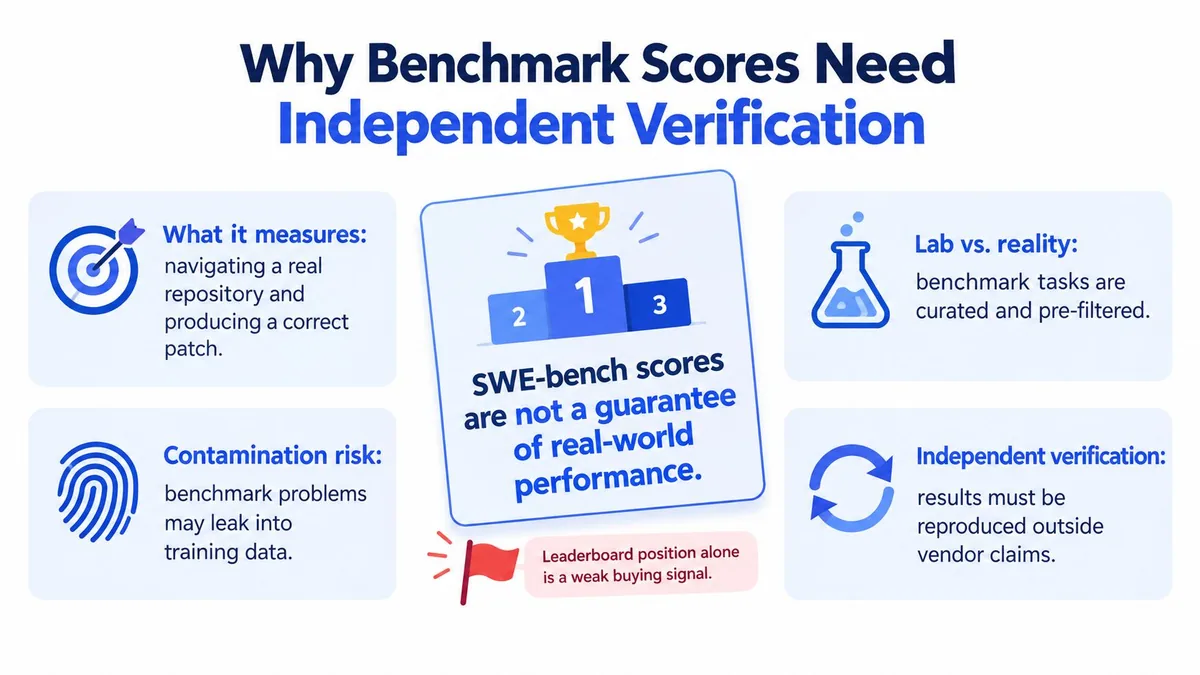
What the empirical caveats show
An empirical ICSE study found that 32.67% of successful SWE-Agent-plus-GPT-4 cases were affected by solution leakage, while another 31.08% passed because tests were weak. After removing both categories, the reported resolution rate fell from 12.47% to 3.97%. These findings are detailed in the study of SWE-bench solution leakage and weak tests.
The lesson isn’t that benchmarks are useless. It’s that a benchmark result is conditional evidence. A system can perform well against a known distribution and still fail on a clean task with unfamiliar conventions, incomplete tests, or requirements that aren’t encoded in the test suite.
Build verification around the agent
A production team should treat a successful agent run as a candidate change, not an automatic merge. Practical safeguards include:
- Independent regression tests: Add tests that were not supplied as an obvious path to the desired patch.
- Clean-task holdouts: Evaluate on issues kept separate from the agent’s development or tuning process.
- Behavioral review: Check requirements that hidden tests may not express, such as authorization, compatibility, and error handling.
- Failure-mode records: Track wrong-file edits, incomplete multi-file changes, test overfitting, and unsafe commands instead of storing only pass or fail.
- Rollback readiness: Keep the branch and workspace state recoverable when an iteration takes the wrong direction.
A benchmark can help you compare systems. It shouldn’t replace repository-specific evaluation. The buying signal you need is not a high score in isolation, but reliable behavior under your own tests, permissions, conventions, and review process.
Platform-Specific Use Cases and Mobile Tethered Agents
Long-running agents create a practical problem that autocomplete never had. If a suggestion appears while you’re typing, you’re already there to accept or reject it. If an agent is exploring a repository, running tests, and waiting for approval, the developer may want to check progress without returning to a desk.
That’s the use case for a tethered mobile workspace. Clawdex provides access to Codex, Cursor, and OpenCode from a phone while connected to the user’s own Mac. Its portable interface brings agents, threads, files, and Git into the same supervision workflow, rather than replacing the developer’s machine with an unrelated remote environment.
A realistic session might begin at a desk. You assign an agent a bounded refactor, review its plan, and leave for a meeting. From your phone, you check the current thread, inspect a changed-file diff, respond to a clarification, approve an action, or stop the run. The Mac remains the execution host, while the phone becomes a control surface.
KeySwitch addresses a related desktop problem. It’s a macOS keyboard layer that exposes Codex Micro controls through fn+control and supports custom mappings, giving developers a quicker way to keep agent controls accessible during local work.
Remote supervision targets the delegation gap
An Agentic Coding Trends Report from Anthropic says developers use AI in roughly 60% of their work, while reporting fully delegated only 0–20% of tasks. The exact gap varies by team and role, but the distinction is important. Frequent AI assistance doesn’t mean developers have handed over accountability.
Mobile access therefore targets the monitoring gap, not full delegation. Developers still need to frame the problem, review architecture, interpret ambiguous failures, and approve consequential changes. A phone can help them respond quickly without pretending that a compact interface removes the need for judgment.
| Access Point | Best For | Supervision Style | Trade-Off |
|---|---|---|---|
| Desktop IDE | Interactive implementation and close review | Continuous, cursor-level inspection | Keeps the developer tied to the workstation |
| Terminal | Engineers who prefer explicit commands and text-based state | Direct observation of files, commands, and Git | Requires comfort with terminal workflows |
| Cloud workspace | Tasks that can run in a managed environment | Browser-based monitoring and collaboration | Execution context may differ from the local machine |
| Tethered mobile workspace | Checking long-running tasks away from the desk | Plans, approvals, diffs, threads, and Git from a phone | Small screens make full trace and behavioral review harder |
For a broader comparison of local and remote processing considerations, see this guide to cloud versus on-device AI image generators. The same basic question applies here: where does the work execute, what state can you inspect, and which actions remain under your control?
Getting Started With Agentic Workflows Safely
Start with work that has a clear boundary and a strong way to verify the result. An isolated refactor with good tests is a better first delegation than a production migration with unclear rollback conditions.
Route tasks by risk
Allow more autonomy for bounded refactors. Let the agent explore files, apply repetitive edits, format code, and run tests when the branch is isolated and the expected behavior is already covered.
Require approval for dependency upgrades. New packages can change licensing, security exposure, build behavior, and transitive dependencies. Review the proposed version, lockfile changes, and test evidence before accepting them.
Require approval for schema changes. Database and data-model changes affect more than the current branch. Make the agent show the migration, compatibility assumptions, and rollback path.
Keep production-side effects unattended. Don’t allow an agent to deploy, alter live data, rotate credentials, or trigger irreversible external actions without a human-controlled checkpoint.
Make supervision observable
Review the diff before approving the next step. Watch the event stream for a plan that drifts from the task, commands that don’t belong in the repository, or repeated test failures that indicate a flawed assumption. Keep rollback available, and don’t approve a patch from a compact interface until you’ve seen enough of the execution trace to understand what changed.
You can also improve task quality by writing acceptance conditions before starting. State the files or subsystem in scope, behaviors that must remain unchanged, tests the agent should run, and actions it must not take. Clear constraints reduce the chance that the agent fills an ambiguous requirement with an elegant but incorrect interpretation.
The same discipline applies outside coding. For example, editing photos with AI privately also depends on understanding where processing occurs and what control the user retains. In both workflows, convenience matters less than knowing what the system can access and what it may change.
Agentic coding tools reward developers who treat them as delegatable juniors, not autonomous replacements. Mobile tethered workspaces are a natural extension of that model when an agent outlives your desk time, provided that the interface keeps plans, diffs, commands, tests, and approvals visible.
ArkalEdge brings together focused projects for mobile coding-agent access, on-device creative tools, and developer workflow utilities. Visit ArkalEdge to explore Clawdex, KeySwitch, and the wider set of tools built around practical, controlled interaction with software.